Area Music
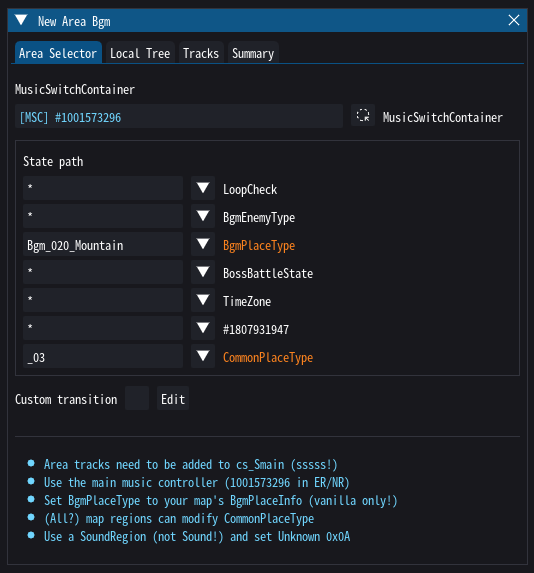
When walking around a map in e.g. Elden Ring, there are usually two songs playing in parallel: a mood theme, and a battle theme. The latter is usually suppressed, but gets overlayed on top when the player enters combat. The state responsible for unmuting this second layer is FieldBattleState (usually set to FieldNormal or FieldBattle).
Note
If you want to instead replace the currently playing song, using a boss bgm for field bosses may be more appropriate.
BgmPlaceType & CommonPlaceType
Now, you may be tempted to setup an entirely new BgmPlaceType state of area music pieces for your beautiful new map. Unfortunately, this is not possible for now - for whatever reason, Fromsoft has put various safeguards in place that I was unable to circumvent so far. Luckily for us, this only hurts your inner autist :)
Because the game won't accept any custom BgmPlaceType values, you still have to put one of the vanilla values into your DefaultMapInfoParam. Which one doesn't really matter since we'll use a state further down the decision tree to override the music playing. This state is CommonPlaceType, and Fromsoft often uses it to slightly alter the theme between different regions of a map (e.g. southern and northern gravesite planes). This allows us to setup map regions that override the area theme - how will be explained further down.
Warning
CommonPlaceType is always set to strings like _07 based on a number. Don't use anything else here.
Theme Variations
Yonder's area bgm tool allows you to setup further variations, e.g. for indoor/outdoor, time of day, or different types of weather. In principle you can use any state here you want - just be aware that any states used in the music decision tree, up to and including CommonPlaceType, will result in different branches getting activated.
Trims & Loop Points
To trim a song and adjust where it loops, simply drag the red and green markers on the track view (by default they will be placed at the very beginning and end). You can test your loop by enabling the Loop and Test checkboxes, which will cause yonder to only play a few seconds around the loop on repeat. If you also setup a battle theme, it's probably best that it matches the duration of your main theme exactly - either by nature or through trimming.
Tip
For crossfades see the guide on transition rules!
Map Regions
Once you've setup your area music you will have to add regions to your map to decide where to use which CommonPlaceType. There are a couple of region types which seem to have a field for setting an override (e.g. no-ride regions in EldenRing), but these are mostly unknowns. The one region which is known to work (and actually meant for exactly this use case) is the SoundRegion type (not Sound!).
Tip
If the CommonPlaceType field is now known in your game you will have to find examples in vanilla maps - it's a fairly common pattern and should be easy to identify.
The process is simple enough: just duplicate a region with the correct type in/to your map, rename it for posterity, and set the CommonPlaceType field to the number you want (see above). If the entityId field is set you should probably set it to 0 - it's used in EMEVD and must be unique. The regionId field usually has no effect, but I'd still suggest keeping it in the original range (7500+ in Elden Ring) and keep it unique within your map.
