Mass Transfer
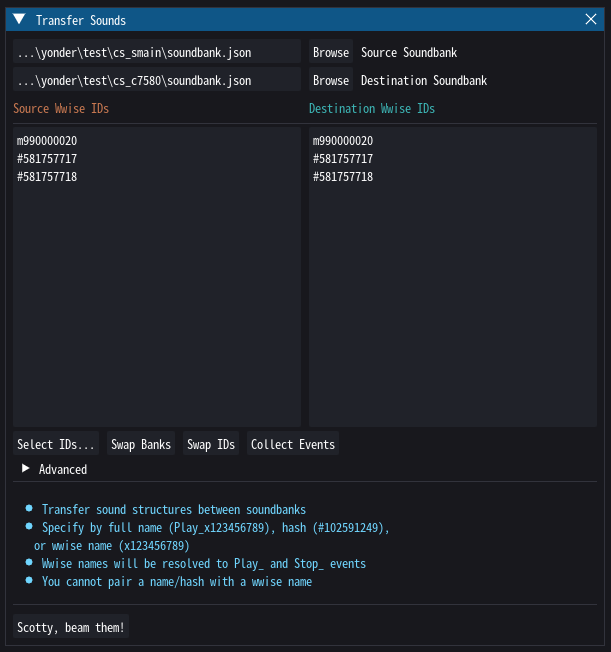
Soundbanks are only loaded when their corresponding game object is loaded, so oftentimes you simply want to transfer a couple sounds from e.g. an enemy's soundbank to the player's. The Mass Transfer tool let's you do exactly that.
Selecting IDs
You can specify the events to transfer in one of three ways, either by typing, or from the Select IDs dialog:
- By hash, e.g.
#123456789. This will transfer this exact node and its subtree. It still needs to be an event for now. - By name, e.g.
Play_c100200300. Applies the same rules as if transferring by hash. You may use this even if Yonder only knows the hash for that event. - By ID, e.g.
c100200300. This will grab the associatedPlayandStopevents (assuming they exist). An ID cannot be paired with an explicit hash or name on the destination side.
As described elsewhere, we largely rely on detective work and informed guesses to figure out what the events are called the game uses to communicate with Wwise; yet sometimes we just don't know. This can leave you in a situation where you e.g. only know the Play event, but not the Stop event. For cases like this, enter the identifier of any object in the hierarchy you want to transfer, then click Collect Events. Yonder will search the source bank's hierarchy for events that either have a Play action targeting the unknown ID, or have a Stop action targeting the unknown ID and no other Play actions.
Warning
This will be done for every ID currently listed in your Source IDs list, so tread carefully.
Duplicates
While Wwise doesn't mind if multiple objects within the same bank or even across banks use the same IDs, this can cause issues if the objects' attributes (and especially their types) change. Ideally, each object only has a "single source of truth" (although even Fromsoft has a few duplicates here and there).
When transferring e.g. events from an enemy soundbank to the player soundbank, it is generally advised to assign new names to them. Otherwise the game might use your transferred sounds, including any modifications you made to them.
Tip
The mass transfer tool will never transfer objects whose ID already exists in the destination bank.
Since the mass transfer tool also transfers ActorMixers and Busses (the "up-tree"), which are usually stored in the main soundbanks, creating duplicates of these was rather easy in the past. Yonder will now avoid copying known instances of these object types if they are defined in one of the main soundbanks (so custom instances defined e.g. in enemy soundbanks are still transferred). This can be changed in the Advanced section.
