Boss Music
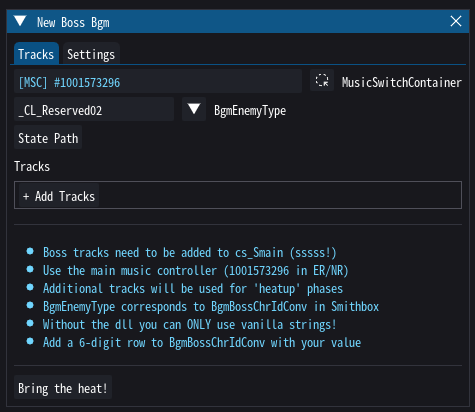
Boss tracks are regular music tracks with complications. It's worth considering the following:
- should your boss theme play an intro before going into the loop?
- does your boss have additional phases and if so, how many?
Yonder can set all of this up for you (in the Fromsoft-typical fashion), but everything you add will require additional effort and attention to detail.
Tip
Highly recommend you read up on music containers and sources before you continue.
BgmEnemyType
As briefly described in the section about custom banks, in Fromsoft games all music lives under a single MusicSwitchContainer which transitions between music pieces using a decision tree that's reading global states. For this reason, music can only be added to the cs_smain (s!) for now. The state that causes the container to switch to boss music is called BgmEnemyType - if it's set to a value associated with a boss bgm the boss music plays, otherwise the decision is left to other state variables (e.g. BgmPlaceType for different maps). You can of course still use additional states, e.g. to introduce variations for different weather types.
Tip
To find and browse the music decision tree, open the cs_smain (sss!) soundbank and unfold the Play_m000000000 event. You will find a music switch container with several dozen children. Open it and let it load, then unfold the Decision Tree widget.
When setting up a new boss bgm you need to choose a string it should react to. This can be your boss' chr ID, it's name, or anything else as long as you're able to remember it. Write it down somewhere. No, really - do it.
Warning
Unfortunately, for whatever reason Fromsoft has decided to hardcode and validate the strings that are allowed to be used for boss themes. However, there are a couple of unused ones that can be used straight away (depending on the game). Keep an eye out for "Reserved" strings. Yonder also provides a dll that allows you to use arbitrary strings - this is described further down.
Trims & Loop Points
Even if you don't want any extras, you probably still want to trim your song and define where it should loop. To adjust these, simply drag the red and green markers on the track view (by default they will be placed at the very beginning and end). You can test your loop by enabling the Loop and Test checkboxes, which will cause yonder to only play a few seconds around the loop on repeat.
Info
In Yonder, trims directly change the music segment's duration, making it difficult to manage multiple tracks within one segment. This came about because I didn't really understand how these work. This will need an overhaul in the future, but since Fromsoft never uses this it's not a priority for now.
Intros
An intro plays the first part of a track before the loop-start point once and then enters the loop. If enabled, Yonder will do exactly that: setup the part between begin-trim and loop-start as an intro, then setup a segment with the actual loop. This is done using a MusicRandomSequenceContainer with a playlist where the first playlist item is marked as a loop base.
Boss Phases
When adding additional audio files to the boss bgm tool they are setup as additional boss phases (also known as heatup or HU). Each file past the first will become one additional heatup track. Fromsoft allows for at least 2 heatup phases in Elden Ring (e.g. Malenia), 3 in Nightreign (Straghess). Music phases are controlled via EMEVD which sets the BossBattleState Wwise state.
Tip
For crossfades see the guide on transition rules!
Game Setup
Boss music is controlled through EMEVD, Fromsoft's event scripting language, which you can edit using Darkscript3. There are several very nice tutorials on how to write EMEVD (or rather MattScript), but the two instructions you want to look out for are SetBosBGM and SetFieldBattleBGMHeatUp.
These instructions don't set the BgmEnemyType or BossBattleState directly. For the SetFieldBattleBGMHeatUp you pass it a "threat level" integer (a number between 0 and ~50). This will be mangled into a string like FieldBoss_ThreatLevel15 and is meant for generic bosses open-world that don't have a unique theme.
More interestingly, of course, is SetBossBGM, which is used for unique boss themes. Still, you don't pass it a string - instead you give it an ID which maps to a row in the WwiseValueToStringParam_BgmBossChrIdConv param in the regulation bin, which then contains the actual string which is used to set the Wwise state. However, as mentioned above, unless you're using a dll, only the predefined strings can be used, which leaves you with 8 unused "Reserved" states in Elden Ring and 1 (2?) in Nightreign.
To activate a heatup phase you don't need to do anything extra. Simply pass e.g. BossBGMState.HeatUp to the SetBossBGM instruction instead of BossBGMState.Start/Stop/etc..
An EMEVD event for a boss with no heatup phases may look like this:
$Event(
  0,
  Default,
  function (bossEntityId, bossDefeatedFlag, areaEntityId, bgmParamId) {
    DisableCharacter(bossEntityId);
    DisableCharacterAI(bossEntityId);

    // Check if boss is already defeated
    if (EventFlag(bossDefeatedFlag)) {
      DisableCharacterCollision(bossEntityId);
      ForceCharacterDeath(bossEntityId, false);
      EndEvent();
    }

    // Player enters area
    WaitFor(InArea(10000, areaEntityId));

    // The boss makes its entrance
    EnableCharacter(bossEntityId);
    EnableCharacterAI(bossEntityId);
    ForceAnimationPlayback(bossEntityId, 20026, false, false, false);
    SetBossBGM(123456, BossBGMState.Start);
  },
);
Info
Fromsoft uses common events to cover repeating patterns like this. For bosses, these are 9005800, 9005801, 9005811, and 9005822, which will also handle e.g. fog walls and stopping the music once the boss is defeated. Compare with vanilla events and explore!
Unlocking Additional States
In order to use arbitrary strings for the BgmEnemyType you need this dll. Yonder currently has dlls for Elden Ring and Nightreign - don't even try to use them on other games, it won't work. You can load them like any other dll by adding them to your me3 profile:
    [[native]]
    path=<path/to/unlock_wwise_state.dll>
Once you have done this, new rows you add to WwiseValueToStringParam_BgmBossChrIdConv param can be used like any other ID in SetBossBGM - just make sure they have at most 6 digits.
Bug
Note that this is not enough for Nightreign - you also need to unmangle your soundbanks!
